Back to all prompts
ClaudeCoding
FreeClaude Code Tips
Get started with Claude Code using these 10 tips, covering terminal vs VS Code, installing specific versions, and more, optimized for Claude AI tool.
y
ykdojo4.8
The Prompt
# 10 Claude Code tips for newer users
I've noticed more and more people are trying Claude Code and Cowork for the first time recently, so I wanted to give them a few pointers to get started with.
Full repo with 45 tips: https://github.com/ykdojo/claude-code-tips
## 1. Terminal vs VS Code vs Desktop vs Cowork
The terminal version is generally the most advanced one - it's where Claude Code started, and I think it gets the most development time, so it tends to be the most feature-rich. Some people prefer the VS Code extension, and less technical users might prefer Cowork. But if you can use the terminal, I'd recommend starting there.
## 2. Installing a specific version
For the terminal version, there's an npm option and a native binary option. The native binary works well, but I personally recommend installing version 2.1.19 instead of the latest, because newer versions can be buggy (or pick a version you like). You can install a specific version like this:
```bash
curl -fsSL https://claude.ai/install.sh | bash -s 2.1.19
```
On Windows PowerShell:
```powershell
& ([scriptblock]::Create((irm https://claude.ai/install.ps1))) 2.1.19
```
You can verify your installation with `claude --version`.
## 3. Back up important files and use version control
Don't be [that person](https://www.reddit.com/r/ClaudeAI/comments/1pgxckk/claude_cli_deleted_my_entire_home_directory_wiped/) who lost their entire home directory. Back up anything important before you start, and use version control (Git) for your projects. Claude Code can make mistakes, and having version control means you can always roll back if something goes wrong.
## 4. Learn to test the output well
The thing with Claude Code and AI in general is that they can introduce subtle bugs. So make sure to test the outputs really well so that you don't end up with a lot of bugs. You can even have Claude Code test its own code - for example, by having it write tests. Just make sure the tests look valid.
## 5. Put repeated instructions in CLAUDE.md
If you find yourself telling Claude Code the same thing over and over again, put those instructions in a CLAUDE.md file. You can just ask Claude Code to do it on your behalf - either in the project folder (`./CLAUDE.md`) for project-specific instructions, or globally (`~/.claude/CLAUDE.md`) for things that apply everywhere. It should be able to find the right file and edit it for you.
If Claude Code isn't following an instruction consistently, another option is to set up a [hook](https://docs.anthropic.com/en/docs/claude-code/hooks). For example, if you want it to always use `python3.12` instead of `python3`, you can create a hook that stops it from running `python3` and tells it to use `python3.12` instead.
## 6. Set up browser integration
If you need Claude Code to interact with web pages, I recommend these two options:
- **Playwright MCP** - Generally works better for most tasks. Install it with: `claude mcp add -s user playwright npx @playwright/mcp@latest`
- **Claude in Chrome** - Toggle with `/chrome`. Useful when you need a logged-in state from your own browser profile.
If you use Claude in Chrome, I'd recommend adding this to your CLAUDE.md to make it more reliable:
```markdown
# Claude for Chrome
- Use `read_page` to get element refs from the accessibility tree
- Use `find` to locate elements by description
- Click/interact using `ref`, not coordinates
- NEVER take screenshots unless explicitly requested by the user
```
## 7. Learn to quickly review the output
I personally use GitHub Desktop for this. It has a nice diff view that makes it easy to see exactly what Claude Code changed. You can also have Claude Code create a draft PR and review it there before turning it into a real PR.
## 8. Research, plan, execute, test
1. **Research** - Put enough time into understanding the problem first. Build up domain knowledge so you can guide Claude Code effectively.
2. **Plan** - Have Claude Code come up with a plan before writing code. You can use plan mode (`/plan` or Shift+Tab) for this.
3. **Execute** - Write the code.
4. **Test** - Make sure everything actually works.
## 9. Keep each conversation short
When you start a new conversation with Claude Code, it performs the best because it doesn't have all the added complexity of the previous context. As you talk to it longer and longer, the context gets longer and the performance tends to go down.
So start a new conversation for every new topic, or whenever the performance starts to drop. It's better to have many short, focused conversations than one long one.
## 10. Learn to juggle a few sessions at the same time
Once you're comfortable with Claude Code, try running two or three sessions at the same time in different terminal tabs. My method is what I call a "cascade" - whenever I start a new task, I open a new tab on the right. Then I sweep left to right, going from oldest tasks to newest.
I'd recommend focusing on at most three or four tasks at a time. More than that and it gets hard to keep track of what's happening.
## 11. (Bonus) Use Git worktrees for parallel branch work
If you're working on multiple things at the same time in the same project and you don't want them to get conflicted, Git worktrees are a great way to do that. You can just ask Claude Code to create a git worktree and start working on it there - you don't have to worry about the specific syntax.
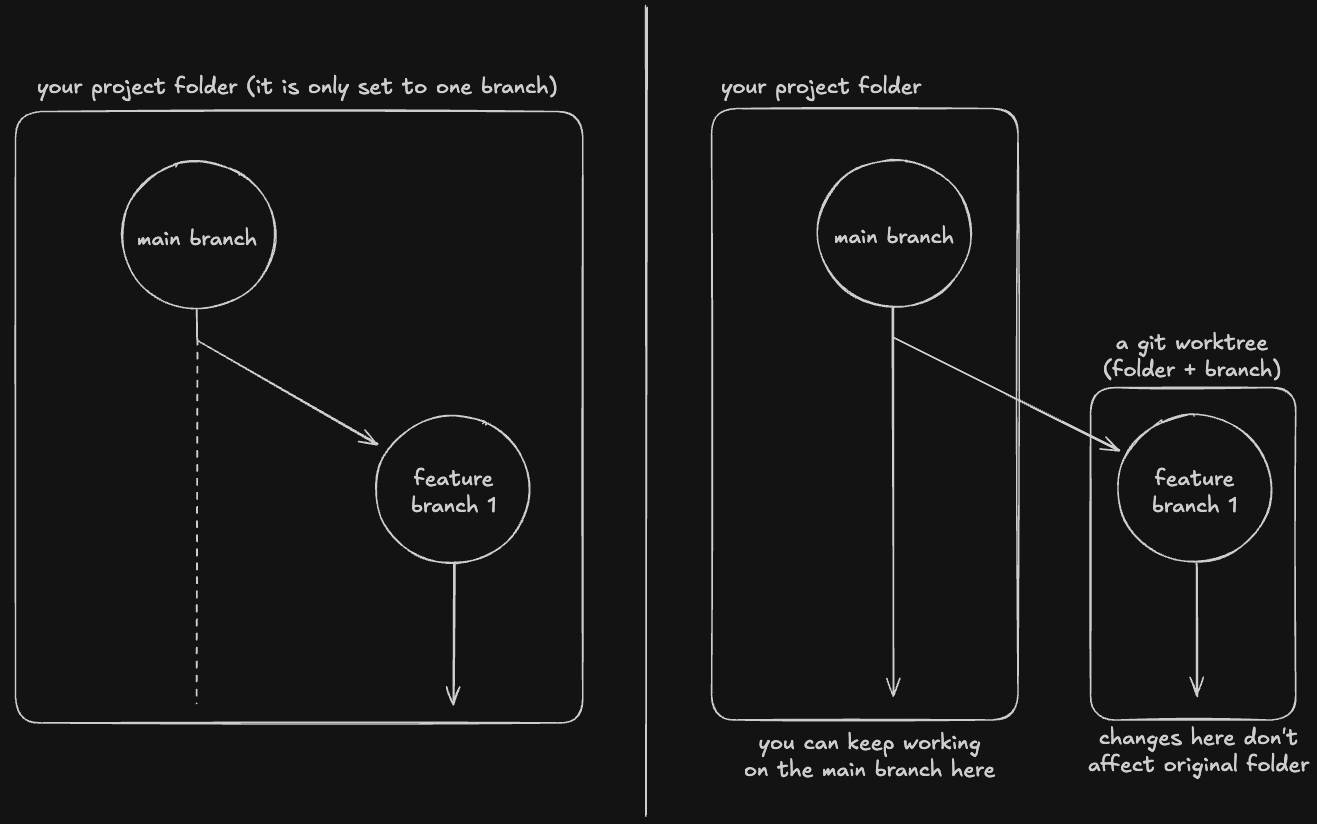
The basic idea is that you can work on a different branch in a different directory.
### What are git worktrees?
A git worktree is just like any other git branch, but with a new directory specifically assigned to it.
So if you're working on, let's say, the main branch and feature-branch-1, then without git worktrees, you can only work on them one at a time because your project folder can only be set to one branch at a time.
However, with a git worktree, you can keep working on the main branch (or any other branch for that matter) in the original project folder, and at the same time work on feature-branch-1 in a new folder.
---
For a more comprehensive list of 25 tips, feel free to check my other Reddit post: https://www.reddit.com/r/ClaudeAI/comments/1qgccgs/25_claude_code_tips_from_11_months_of_intense_use/
#claude#code#tips#getting#started#ai#tool
Source: ykdojo/claude-code-tips by ykdojo · License: MIT
Related Prompts
Claude$1.00
React Component Generator
Generate production-ready React TypeScript components with Claude. Create fully typed components with props, hooks, and...
Codingcodingreact
by DevCraft
4.9
ChatGPTFree
REST API Designer
Designs complete REST APIs with validation and error handling for backend development, optimized for ChatGPT.
Codingcodingapi
by APIArchitect
4.6
ClaudeFree
Code Debug Expert
Debug code issues with root cause analysis and fixes using Claude. Identify errors, explain causes, and provide correcte...
Codingcodingdebug
by BugHunter
4.8